More Locations. Clearer Numbers.
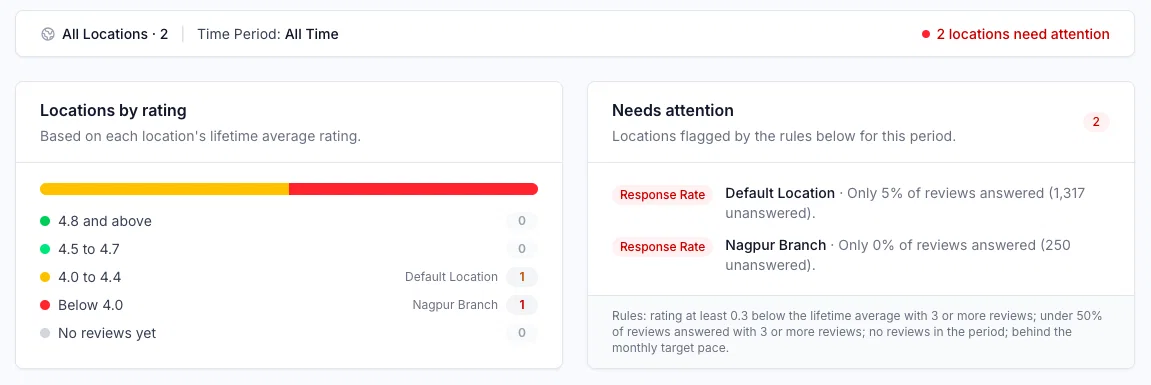
Per-location reporting is now live across dashboards, reports, and shared views.
Until now, the All Locations view told you how the business was doing overall — but not which location was carrying the numbers and which one was quietly slipping. If you run multiple outlets, that gap meant opening each location one by one to find out.
That's now fixed.
Every location on one screen
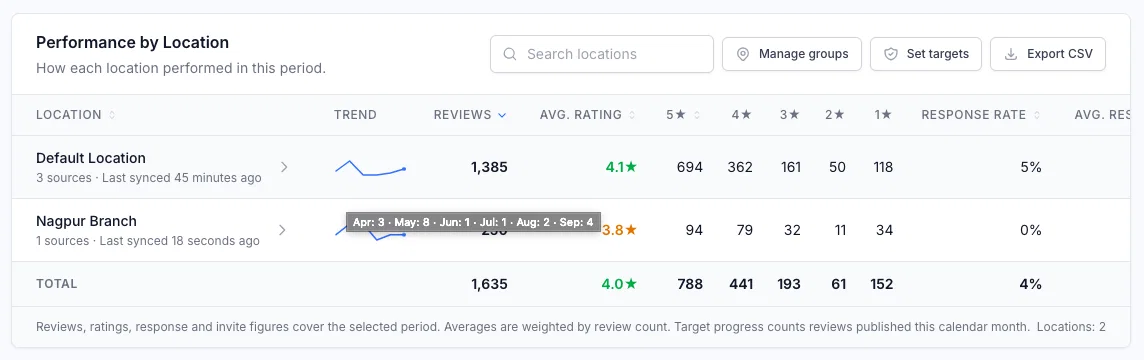
The All Locations view includes a detailed per-location table:
- Reviews collected
- Average rating
- Review response rate
- Star distribution
- Change vs. the previous period
- A trend line on every row
You can sort, search, group, export, and click into any location for the full view.
Location groups
Group your locations however your business is actually organised — by region, by franchisee, or by brand. Each group gets its own subtotal, so a regional manager can see their region's numbers without filtering through everything else.
Review targets
Set a monthly review target per location. You'll see which locations are on track and which are behind while there's still time in the month to do something about it — instead of finding out on the 1st.
Needs Attention
Locations that need action are flagged automatically: a falling rating, unanswered reviews, no connected review source, or a sync that has stalled. Each flag tells you the reason in plain language, so you know what to fix without digging.
Google Business Profile, by location
Google Business Profile performance now breaks down per location — views, searches, calls, and direction requests. Useful when one outlet is getting found and another isn't, and you need to know which.
Reports and shared dashboards
Multi-location reporting carries through to everything you send out. The summary PDF now includes the location breakdown, star distribution, and the Needs Attention list. Shared dashboards can open directly on the combined multi-location view, and every report clearly states which organisation and location it covers.
Where to find it
Open the All Locations view from your dashboard. Groups and review targets are set up from your location settings.
5